
windows本地部署ollama大模型并通过frp暴露到公网中,外网使用Open WebUI进行访问
1. ollama windows安装
https://ollama.com/download 下载并运行 Ollama安装包OllamaSetup.EXE,安装完成后ollama会自动将启动程序复制到开机自启startup文件夹中。
2. frp安装
下载压缩包并解压 https://github.com/fatedier/frp/releases/tag/ 文件名包含frpc的为客户端使用,frps的为服务端使用。
这里frp版本为0.52.3,frpc.toml配置字段与frps.toml配置字段存在不一致!!
(1)客户端frpc.toml配置
serverAddr = "x.x.x.x"
serverPort = 7000
auth.method = "token"
auth.token = "xxx"

[[proxies]]
name = "ollama"
type = "http"
localIP = "127.0.0.1"
localPort = 11434
customDomains = ["x.x.x.x"]
locations = ["/", "/api"]
hostHeaderRewrite = "127.0.0.1"
ollama localPort默认为11434 , 一定要使用hostHeaderRewrite将请求host改为127.0.0.1,ollama默认只允许本地访问!!
客户端启动命令:frpc.exe -c frpc.toml
(2) 服务端frps.toml配置
[common]
bindPort = 7000
vhost_http_port = vhost_http_port
dashboard_port = dashboard_port
dashboard_user = "xxx"
dashboard_pwd = "xxx"

auth.method = "token"
token = "xxx"
访问ollama地址为 http://x.x.x.x:vhost_http_port/
3. windows安装Open WebUI
(1)安装命令
这里我没有使用docker安装
#Requirements 📦
🐰 Node.js >= 20.10 or Bun >= 1.0.21
🐍 Python >= 3.11

#Build and Install 🛠️
#Run the following commands to install:
# 以下命令需要在 git bash或wsl中进行

git clone https://github.com/open-webui/open-webui.git
cd open-webui/

# Copying required .env file
cp -RPp .env.example .env

# Building Frontend Using Node
npm i
npm run build

# Serving Frontend with the Backend
cd ./backend
pip install -r requirements.txt -U
bash start.sh
参考官方文档链接 https://docs.openwebui.com/getting-started/#how-to-install-without-docker
在执行pip install -r requirements.txt -U 可能会出现报错:required to install pyproject.toml-based projects
解决方案:
- 进入VS官网 https://visualstudio.microsoft.com/zh-hans/visual-cpp-build-tools/ ,下载Microsoft C++ 生成工具

- 安装时勾选上“使用C++的桌面开发”,可选的保持默认即可
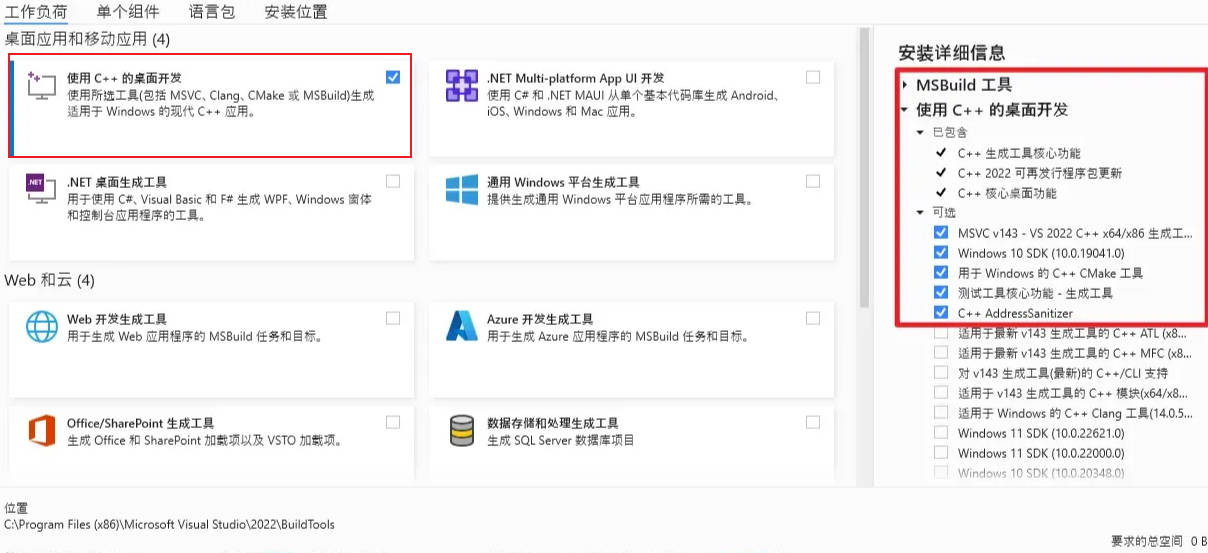
- 安装完后重新运行
pip install -r requirements.txt -U
参考链接:https://blog.csdn.net/m0_56190554/article/details/129296269
(2)启动
进入\Open WebUI\open-webui\backend 文件夹下,双击start_windows.bat 文件启动,首次启动需要下载资源,最好挂上梯子,不然下载失败无法启动。
(3)设置后端ollama地址
登录Open WebUI后 右上角 设置/连接/ollama基础URL
ollama配置参考:https://blog.csdn.net/wjjc1017/article/details/137734467